 2c3316b036
Rename the flag to --unsafe-disable-auth so the risk is visible at the call site, and close the ways the mode could outlive itself: - Keep an explicit -P/--startup-psw instead of dropping it. Without a password in the database, --no-unsafe-disable-auth brought firegex up in its initial-setup state, where anyone able to reach it could choose the password. - Refuse /api/login, /api/set-password and /api/change-password while authentication is disabled: an anonymous caller could otherwise plant a credential that kept working once authentication was turned back on. run.py config --password still works, writing to the database from the host. - Print a banner on every start/restart with authentication disabled. The flag is persisted in the config file, so a later bare `run.py start` inherits it. - Report the change in `run.py config --unsafe-disable-auth`, which claimed "No configuration changes specified" while persisting it, and stop that command from nulling the stored port and host on the way. - Expose the state as auth_disabled in /api/status and hide the logout button and the change-password entry, which were silent no-ops in this mode. Tests cover both directions of the toggle, the socket.io handler, the password endpoints and the -P handling. |
||
|---|---|---|
| .. | ||
| results | ||
| utils | ||
| api_test.py | ||
| benchmark.py | ||
| comparemark.py | ||
| ipfilter_test.py | ||
| nfproxy_test.py | ||
| nfregex_test.py | ||
| ph_test.py | ||
| README.md | ||
| requirements.txt | ||
| results_plotter.py | ||
| run_tests.sh | ||
| stress_test_history.py | ||
| test_http_history.py | ||
| tls_test.py | ||
Firegex tests
GO BACK
Tests are a quick and dirty way to check if your modification to the backend code didn't break anything.
Running all the tests
If you are working on the same machine firegex is running on, you can just run run_tests.sh
$ ./run_tests.sh
It will automatically perform a general API test, Netfilter and Proxy Regex test. You can also run tests manually:
$ ./api_test.py -h
usage: api_test.py [-h] [--address ADDRESS] --password PASSWORD

$ ./nfregex_test.py -h
usage: nfregex_test.py [-h] [--address ADDRESS] --password PASSWORD [--service_name SERVICE_NAME] [--port PORT]
                [--ipv6] [--proto {tcp,udp}]

optional arguments:
-h, --help            show this help message and exit
--address ADDRESS, -a ADDRESS
                        Address of firegex backend
--password PASSWORD, -p PASSWORD
                        Firegex password
--service_name SERVICE_NAME, -n SERVICE_NAME
                        Name of the test service
--port PORT, -P PORT  Port of the test service
--ipv6, -6            Test Ipv6
--proto {tcp,udp}, -m {tcp,udp}
                    Select the protocol

$ ./px_test.py -h
usage: px_test.py [-h] [--address ADDRESS] --password PASSWORD [--service_name SERVICE_NAME] [--port PORT]

optional arguments:
-h, --help            show this help message and exit
--address ADDRESS, -a ADDRESS
                        Address of firegex backend
--password PASSWORD, -p PASSWORD
                        Firegex password
--service_name SERVICE_NAME, -n SERVICE_NAME
                        Name of the test service
--port PORT, -P PORT  Port of the test service
Running a Benchmark
./benchmark.py
options:
-h, --help            show this help message and exit
--address ADDRESS, -a ADDRESS
                        Address of firegex backend
--port PORT, -P PORT  Port of the Benchmark service
--internal-port INTERNAL_PORT, -I INTERNAL_PORT
                        Internal port of the Benchmark service
--service-name SERVICE_NAME, -n SERVICE_NAME
                        Name of the Benchmark service
--password PASSWORD, -p PASSWORD
                        Firegex password
--num-of-regexes NUM_OF_REGEXES, -r NUM_OF_REGEXES
                        Number of regexes to benchmark with
--duration DURATION, -d DURATION
                        Duration of the Benchmark in seconds
--output-file OUTPUT_FILE, -o OUTPUT_FILE
                        Output results csv file
--num-of-streams NUM_OF_STREAMS, -s NUM_OF_STREAMS
                        Number of concurrent streams
--mode {netfilter,proxy}, -m {netfilter,proxy}
                        Type of filtering
Benchmarks let you evaluate the performance of the filters. You can run one by typing in a shell test.py -p FIREGEX_PASSWORD -r NUM_OF_REGEX -d BENCHMARK_DURATION -m proxy to benchmark the Proxy based regex filter, or -m netfilter to benchmark the Netfilter based regex filtering.
It uses iperf3 to benchmark the throughput in MB/s of the server, both with filters, without filters, and for each new added regex. It will automatically add a new random regex untill it has reached NUM_OF_REGEX specified in the arguments.
You will find a new benchmark.csv file containg the results.
Firegex Performance Results
The test was performed on:
- Macbook Air M2 16GB RAM
- On a VM powered by OrbStack with Fedora Linux 41 (Container Image) aarch64
- Linux 6.12.13-orbstack-00304-gede1cf3337c4
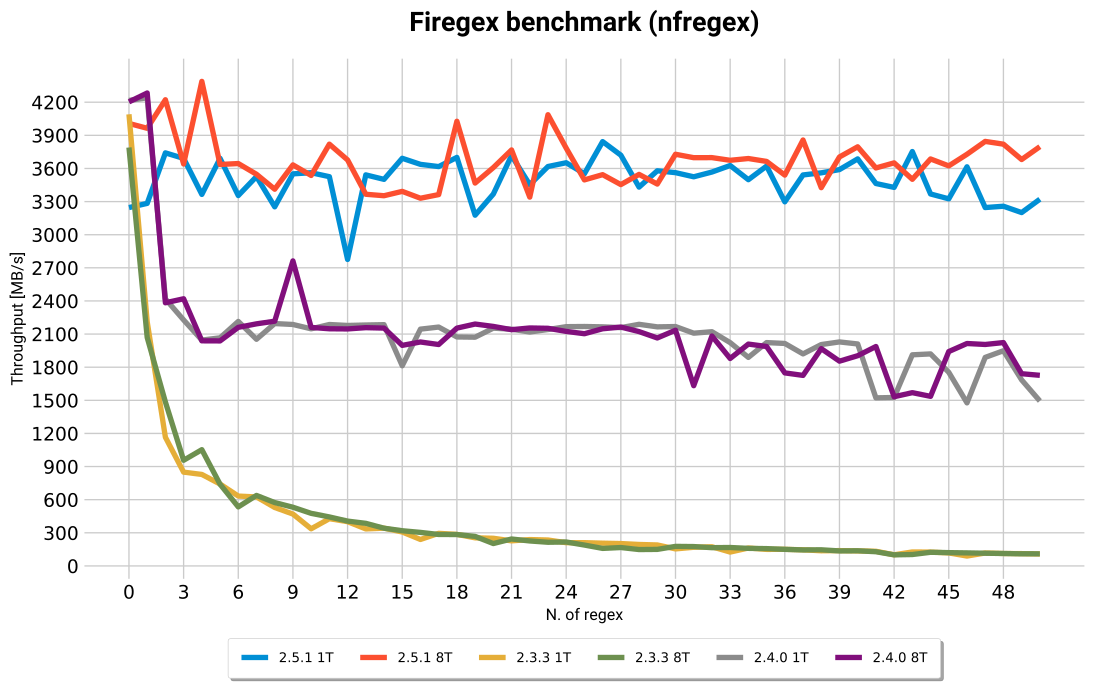
Command: ./benchmark.py -p testpassword -r 50 -d 1 -s 50
NOTE: 8 threads performance before 2.5.0 do not change due to the fact that the source and destination ip is always the same, so the packets are sent to the same thread by the kernel. https://netfilter.vger.kernel.narkive.com/sTP7613Y/meaning-of-nfqueue-s-queue-balance-option
Internally the kernel hashes the source and dest ip and choose the target thread based on the hash. If the source and dest ip are the same, the hash will be the same and the packets will be sent to the same thread. This is a problem in a CTF, where we usually have a NAT to hide real IPs.
Firegex 2.5.0 changes the way the threads are assigned to the packets, this is done userland, so we can have a better distribution of the packets between the threads.
The charts are labeled as follows: [version]-[n_thread]T eg. 2.5.0-8T means Firegex version 2.5.0 with 8 threads.
From the benchmark above we can't see the real advantage of multithreading in 2.5.1, we can better see the advantage of multithreading in the chart below where a fake load in filtering is done.
The load is simulated by this code:
volatile int x = 0;
for (int i=0; i<50000; i++){
    x+=1;
}

In the chart above we can see that the 2.5.1 version with 8 threads has a better performance than the 2.5.1 version with 1 threads, and we can see it as much as the load increases.
Command: ./comparemark.py nfproxy -p testpassword -d 1 -s 50 -V 100
The code used to test matches the following regex with the python re module:
(?:[a-z0-9!#$%&'*+/=?^_`{|}~-]+(?:\.[a-z0-9!#$%&'*+/=?^_`{|}~-]+)*|"(?:[\x01-\x08\x0b\x0c\x0e-\x1f\x21\x23-\x5b\x5d-\x7f]|\\[\x01-\x09\x0b\x0c\x0e-\x7f])*")@(?:(?:[a-z0-9](?:[a-z0-9-]*[a-z0-9])?\.)+[a-z0-9](?:[a-z0-9-]*[a-z0-9])?|\[(?:(?:25[0-5]|2[0-4][0-9]|[01]?[0-9][0-9]?)\.){3}(?:25[0-5]|2[0-4][0-9]|[01]?[0-9][0-9]?|[a-z0-9-]*[a-z0-9]:(?:[\x01-\x08\x0b\x0c\x0e-\x1f\x21-\x5a\x53-\x7f]|\\[\x01-\x09\x0b\x0c\x0e-\x7f])+)\])


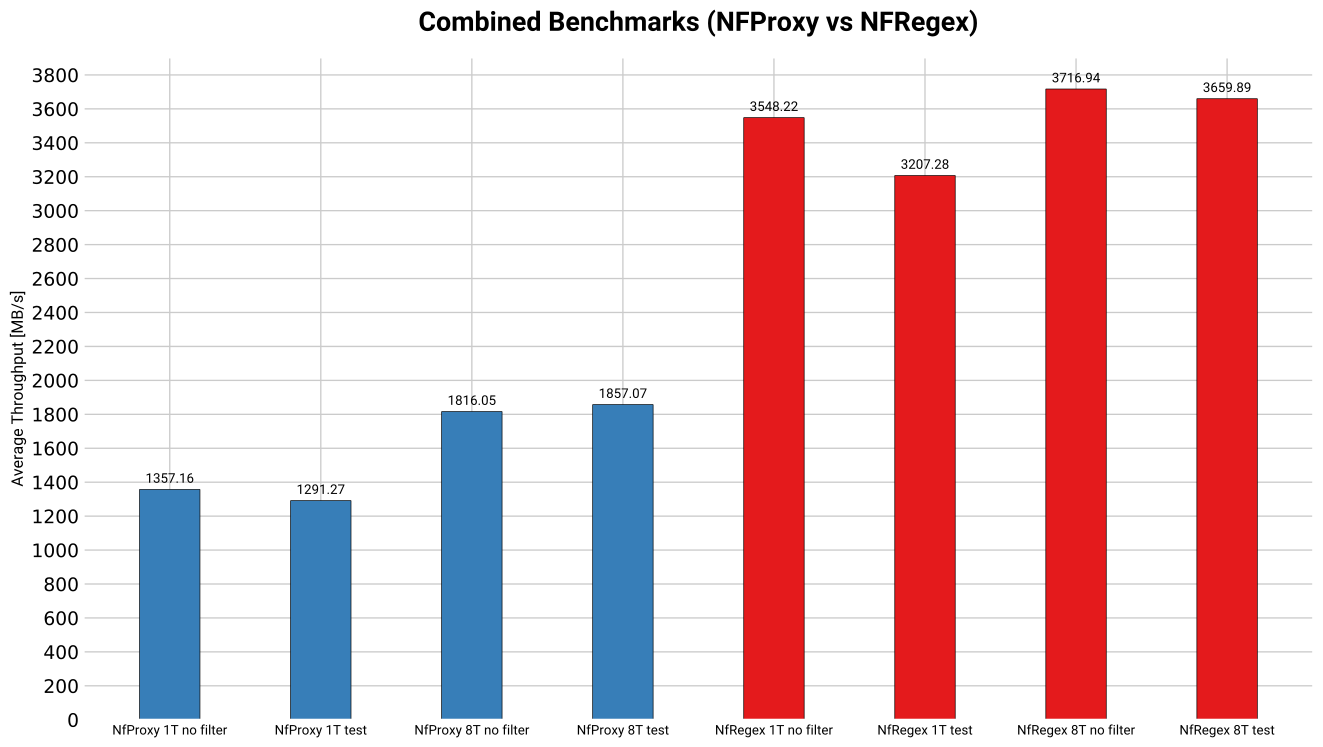
Comparing nfproxy with nfregex
Nfproxy has obviously a worse performance than nfregex, but it is more flexible and can be used in more complex scenarios.